Choosing an in-car video player can transform long drives into comfortable, distraction-free journeys. This guide reviews top options that support dual screens, region-free playback, HDMI or AV syncing, and child-friendly features. Each pick below highlights core capabilities, compatibility, and installation ease to help you find a model that fits your vehicle and family needs.
A quick summary of selected products:
| Product | Brand | Key Features | Notes |
|---|---|---|---|
| WONNIE 12″ Dual Car DVD Players | WONNIE | Dual players, all-region, 5-hour battery, mounting brackets | Two-player option with shared or separate movies |
| DESOBRY 10.5″ Car DVD Player | Desobry | HDMI input, sync TV, last memory, USB/SD, region-free | HDMI-enabled, AV In/Out for larger screens |
| FANGOR 7.5″ Dual Car DVD Player | FANGOR | Dual screens, all regions, AV out/in, 5-hour battery | Compact and portable with streaming compatibility limits |
| WONNIE 10.5″ Two Car DVD Players | WONNIE | Dual players, share or separate movies, 5-hour battery | Versatile mounting and dual-view options |
| ARAFUNA 10.5″ Portable DVD Player | Arafuna | 1080P, HDMI input, last memory, USB/SD | High-definition option with HDMI/AV connectivity |
WONNIE 12″ Dual Car DVD Players

The WONNIE 12″ dual car DVD players blend large-screen viewing with flexible installation. Each unit delivers independent playback, allowing passengers to watch different discs or share a single movie via AV connection. The upgraded chips improve clarity, while a sturdier mounting bracket reduces wobble on rough roads. A 5-hour rechargeable battery supports long trips, and the kit includes mounting brackets for quick setup. Supported formats include DVD and CD variants plus USB media up to 32GB FAT32, with standard image, audio, and video codecs. Note that Blu-ray and Bluetooth are not supported.
This configuration emphasizes family-friendly versatility: two independent displays, separate audio outputs, and easy connectivity to external speakers or headphones. The included all-region capability broadens disc compatibility for travelers who collect media from multiple regions. Consider the power setup you prefer on your vehicle—internal battery life vs. keeping one or both players plugged in for extended trips.
DESOBRY 10.5″ Car DVD Player with Headrest Mount
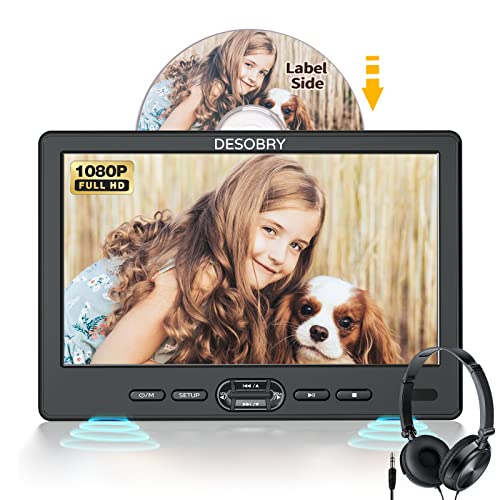
DESOBRY presents a 10.5-inch headrest DVD player with HDMI input and AV in/out for screen syncing to a TV. The suction-style disc-in mechanism enables quick disc loading from the front seat, and the last-memory feature returns to the exact scene after interruptions. HDMI connectivity enables 1080P video transfer from devices such as phones or Raspberry Pi, making it easy to mirror or extend viewing to larger displays. The unit supports a broad range of discs and USB/SD media formats, with FAT32 limits up to 128GB. Note that Blu-ray discs are not supported.
All-region playback ensures compatibility with many discs, though file formats and 1080P playback depend on the connected device. When using HDMI, verify HDMI output compatibility from your source device before pairing. The dual-screen option enhances backseat viewing, but ensure you have adequate headrest space and a stable mounting plan for safe operation.
FANGOR 7.5 Inch Dual Car DVD Player

The FANGOR dual-screen setup pairs a compact 7.5-inch main unit with a matching display, designed to keep kids entertained with different movie selections or synchronized playback via AV connections. The system features an all-regions format compatibility and a 5-hour rechargeable battery, supplemented by an AC adapter and car charger to extend playtime. The AV Out port enables sending content to a larger screen, while the included remote control helps manage playback and volume for each screen. Blu-ray and MP4 formats are not supported, so consider your media collection accordingly.
With two built-in stereo speakers delivering strong sound, the FANGOR package provides engaging audio for backseat travelers without external speakers. The compact footprint makes it suitable for smaller vehicles or limited headroom, though larger screens may be preferred for longer trips. Evaluate whether you need HDMI input or primarily rely on AV connections and USB/SD media support for your travel media library.
WONNIE 10.5″ Two Car DVD Players

This WONNIE pair centers on a 10.5-inch dual-screen system that supports independent playback or synchronized viewing across both displays. Each unit contains its own speaker and a separate headphone jack, enabling private listening or shared sound output. The kit includes two mounting brackets and headrest straps for straightforward installation on most car models. The players support a broad range of disc formats, playlists via USB/SD, and AV output to a larger TV or projector. Note that certain media types like Blu-ray discs and Bluetooth streaming are not supported.
For families seeking a flexible backseat setup, this product emphasizes independent viewing with robust mounting options and separate audio controls. Battery life is around five hours per unit, and the dual- unit configuration helps manage multiple preferences on longer trips. Consider your car’s headrest style and mounting space to ensure a secure fit.
ARAFUNA 10.5″ Portable DVD Player

ARAFUNA offers a 10.5-inch dual-screen solution with 1080P HD output and HDMI input capability. The system supports last memory and a broad media format range via USB/SD, including MPEG, AVI, MKV, and more. The dual displays can mirror content or show different movies, depending on user preference, and the setup includes a mounting bracket for easy headrest attachment. AV In/Out facilitates connection to a TV for larger viewing, making it suitable for both car trips and home use. Blu-ray compatibility remains unavailable.
In choosing between these options, consider screen size, battery life, and whether you need HDMI input for mirroring or prefer straightforward AV connections. The ability to play different content on each screen is a common theme, especially for families with mixed viewing interests. Check the included mounting hardware and whether extra straps or brackets are needed for your vehicle’s headrests.
Buying Guide: Key Purchase Considerations For In-Car Video Players
Display size, clarity, and viewing angle
Screen size directly affects how comfortably passengers can view movies in the backseat. Larger screens like 10.5–12 inches offer better readability on long trips, but they may require more space and stronger mounts. Look for 1024×768 or higher resolution for crisp text and clearer graphics, and verify the tilt and swivel options to optimize angles for different seating positions.
Power options and battery life
Many models feature built-in batteries rated around 5 hours, with additional power through car adapters or AC power. If you frequently drive long distances, ensure there is a reliable charging setup or one screen can operate while connected to the vehicle’s power system. For short commutes, battery life may be less critical than mount stability and media compatibility.
Media formats and regional compatibility
All-region support expands disc compatibility, especially if you own a collection from multiple regions. Check support for DVD, CD, USB drives, and SD cards, including the maximum capacity (often 32GB) and supported file formats (MPG, AVI, VOB, JPEG, MP3, WMA). Note that Blu-ray discs are commonly not supported on budget headrest players.
Connectivity: HDMI vs AV and screen syncing
HDMI input enables mirroring content from phones or media players to the headrest system, delivering high-definition video. AV In/Out lets you connect to an external TV or projector for a larger viewing area. Some kits allow you to play different videos on each screen, while others require you to set one screen to AV to synchronize playback. Consider your household devices and whether you want to mirror or extend content.
Installation and durability
Durable mounting brackets and headrest straps are essential for safe, stable operation on bumpy roads. Ensure brackets fit your vehicle’s headrest design and that any cords and cables are tucked away neatly to avoid passenger interference. Some kits include dual brackets and straps for easier, faster installation.
Sound options and privacy
Dual built-in speakers provide adequate sound in the back seat, with headphone jacks for private listening. If external audio is needed, AV outputs or RCA connections can route sound to a car’s stereo system or external speakers. Noise and ease of listening are important for keeping passengers comfortable on long drives.
Price-to-value considerations
While higher-end models offer larger screens and more features, value-focused options often deliver dual displays, basic HDMI/AV connectivity, and all-region compatibility at a reasonable price. Weigh the features you actually use—HDMI mirroring, last memory, and region-free playback—against the cost to determine the best overall value for your family needs.
Usage scenarios
Consider whether your primary use is family road trips, kids’ entertainment during commutes, or streaming media at hotels. In-car players with dual screens suit families with multiple viewers, while single-screen units can be a practical compromise for smaller vehicles. The right choice balances screen size, media compatibility, and installation ease with your vehicle’s interior layout.