For drivers who want to program, replace, or clone car keys at home, a reliable car key programming tool can save time and money. This guide highlights five capable options that cover remote key programming, DIY blade key work, and advanced diagnostics and key cloning. Each product is evaluated for compatibility, ease of use, and safety, helping you choose the right tool for your vehicle and skill level.
| Product | Key Features |
|---|---|
| Remote2program Universal DIY Programming Car Blade Key Tool | Self-programming via app; supports up to 8 keys per vehicle; broad vehicle coverage; safety and professional support |
| 2PCS Key fob Replacement for GMC Sierra/ Silverado | DIY replacement; no app needed; compatible with multiple Chevy/GMC models; OBD tool included |
| OTOFIX Diagnostics Scanner IM/MO Expert IM1 Programmer | OE-level diagnostics plus IM/MO coding; DoIP & CAN-FD support; XP1 key programming compatibility; cloud updates |
| Keyecu for Xhorse VVDI Mini Key Tool | Transponder generation and remote cloning; supports many vehicle models; broad remote data |
| Remote2program Car Remote Key Tool (No Remote) | DIY pairing via smartphone app; single-vehicle use; blade key compatible; easy self-program |
Remote2program Universal DIY Car Blade Key Tool

The Remote2program Universal DIY Programming Car Blade Key Tool is designed for do-it-yourself key programming. Users download a dedicated app and follow guided steps to program remotes quickly and safely at home. The package emphasizes time savings and professional support, enabling up to eight keys for one vehicle if the car system supports it. It is not universal for every model; some vehicles cannot be programmed with this device, and certain brands are excluded. Preparation includes downloading the app from the App Store or Google Play, or scanning a QR code. If you already have a working remote with a blade, the blade must be cut by a locksmith before pairing. This tool is best suited for tech‑savvy users who want flexibility and at-home convenience, with strong emphasis on compatibility checks before use.
2PCS Key Fob Replacement For GMC Sierra And Chevy Models

These 2PCS Key Fob Replacements are designed for common GMC and Chevy pickups, including Silverado, Sierra, Canyon, and Colorado models from mid‑2010s to early 2020s. The kit emphasizes a straightforward DIY replacement without requiring a smartphone app, making it accessible for users who prefer a traditional approach. An OBD tool is included to support programming tasks. Notes highlight that the OBD tool is vehicle‑specific and will lock to the first vehicle using it; additional keys can be added later if needed, but within the same vehicle. This option suits owners who already have a usable original key and want to avoid dealership fees.
OTOFIX IM1 Programmer With DoIP & CAN-FD Support
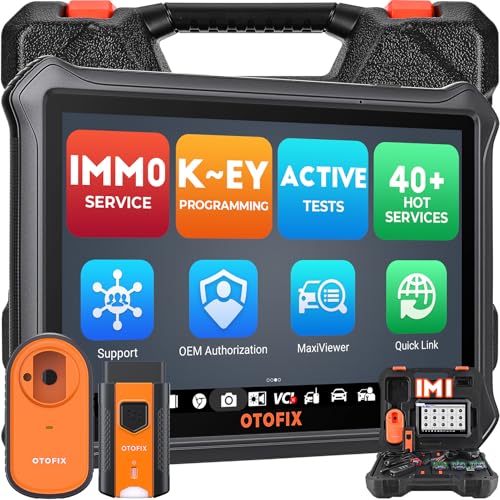
The OTOFIX Diagnostics Scanner IM/M0 Expert IM1 Programmer combines advanced diagnostics with key programming capabilities. It offers IM/MO programming, ke y programming, and a suite of over 40 functions, including all‑system scans and cloud‑linked updates. The 2026 software update expands DoIP and CAN‑FD support, enabling broader vehicle coverage. A notable feature is the XP1 Key Programmer compatibility, allowing cloning and generating exclusive keys, reading/writing EEPROM data, and handling transponder operations. The device targets professional locksmiths and auto shops seeking a comprehensive, all‑in‑one tool, with flexible updates and cloud software management.
Keyecu VVDI Mini Key Tool For Universal Key Work

The Keyecu VVDI Mini Key Tool is built around the Xhorse ecosystem, offering transponder generation for TP and a wide array of transponder types across more than 700 vehicle models. It supports remote cloning and non‑HCS rolling code cloning and handles a broad set of remote data, including PT22XX, LX918, HT6P20, VD5026, and AX5326. Remote generation supports 128 brands and over 2,000 vehicle models, making it a versatile option for locksmiths and enthusiasts dealing with multiple vehicle platforms. The device is designed for use with iOS and Android, providing a portable, multi‑model solution for key creation and programming.
Remote2program Car Key Tool For Large Vehicle Range (No Remote)

This Remote2program kit is designed for self‑programming of blade keys when a new key is needed. It emphasizes safety and avoids locksmith services by enabling smartphone‑guided steps via an app. The device is restricted to a single vehicle for security, but allows up to eight keys for that one vehicle. Preparation involves downloading the corresponding app, scanning a QR code, and cutting the blade if the original remote requires it. The kit focuses on simplicity and a secure workflow, appealing to users who want a compact, reliable home solution for one car model at a time.
Buying Guide: Key Considerations For Choosing A Car Key Programming Tool
When selecting a car key programming tool, consider vehicle compatibility, ease of use, and support resources. If you plan to program a wide range of models, prioritize tools with broad transponder and remote data coverage and updates. For DIY users, a tool that offers clear manuals, video instructions, and responsive customer support can reduce frustration and avoid accidental vehicle issues.
- Vehicle compatibility: Check the list of supported makes, models, and years. Some devices exclude luxury brands or certain model years; verify compatibility with your vehicle’s key type (blade, proximity) and chip (transponder type).
- Programming method: Decide between app‑based DIY programming versus tool‑based OBD/DoIP processes. App methods can be convenient but require smartphone pairing and internet access; OB D/DoIP solutions might require additional hardware.
- Single vehicle versus multi‑vehicle use: Some devices restrict use to one vehicle for security. If you intend to manage keys for multiple cars, look for tools that support multiple profiles on the same vehicle or multiple vehicles if allowed.
- Security and safety: Ensure the tool follows industry safety standards and includes safeguards to prevent harm to vehicle electronics. Look for professional support as a resource for troubleshooting.
- Updates and support: Software updates can expand model coverage and fix bugs. Prefer products offering regular updates and access to a knowledge base or customer service.
- Additional accessories: OBD tools, blade cutting services, and remote data packs can influence total cost and functionality. Confirm what is included in the package and what must be purchased separately.
Choosing the right car key programming tool involves balancing the breadth of car coverage with the user’s technical comfort level. For hobbyists, a user‑friendly option with guided steps and solid support is ideal. For professional locksmiths, a feature‑rich device with robust diagnostics, cloud updates, and wide transponder support provides the best long‑term value. Always verify model compatibility with the manufacturer or seller before purchasing, and consider starting with a model that offers clear return options if it does not work with your vehicle.