Whether you’re a road warrior, a field technician, or a student who travels between campuses, a reliable in-car laptop stand can turn a cramped vehicle into a productive mobile workspace. This guide highlights five top options that balance stability, versatility, and ease of use. Each pick is best for different vehicle setups and priorities, from heavy-duty mounting to quick-removal designs for shared cars.
The following quick-reference table helps you compare the five selections at a glance. Consider where you’ll use the stand most—driver-side desk, backseat work area, or passenger-seat setup—and the weight and size of your laptop.
| Product | Best For |
|---|---|
| VIVO MOUNT-CAR01 | Full articulation, trucks and SUVs with floor bolts |
| Mount-It! Mount | Universal fit and no-drill installation |
| MELIPRON Truck Mount | No-drill, 360° swivel, heavy use |
| DICMKY Car Laptop Mount | Steering wheel or desktop dual-mode use |
| AA-Products K005-B1 | Non-drilling bracket with added accessories |
VIVO Single Laptop Car Mount
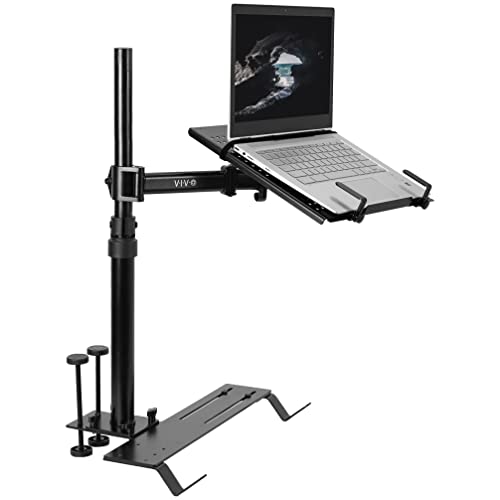
The VIVO MOUNT-CAR01 is designed for vehicles with exposed floor seat bolts, offering three mounting feet for wide compatibility in trucks, vans, cars, and SUVs. This option is best for drivers who need a stable, high-capacity tray that can hold laptops up to 17 inches and 11 pounds. Its ventilated surface promotes airflow to prevent overheating, and the design includes flexible tray clips for quick securement and release while on the move. The telescoping pole ranges from 18.5 inches to 26.3 inches, with a 9-inch range of adjustment for the arm bracket to tailor your viewing angle. This makes it ideal for professional drivers who require a dependable, fixed workstation during long shifts, travel, or on-site service calls.
Who it’s best for: fleet drivers, contractors, or anyone who spends long hours in a vehicle and needs a sturdy, adjustable mounting system. Why selected: robust weight capacity, wide vehicle compatibility, and strong airflow management minimize heat and movement during use.
Caution: installation depends on vehicle floor bolts and may not fit vehicles lacking exposed floor mounting points. Ensure the tray clamps securely before use.
DICMKY Car Laptop Mount Steering Wheel Tray Holder

The DICMKY unit offers a height-adjustable car desk with dual-mode use, switching between steering-wheel lock and desktop modes in seconds. It emphasizes quick setup and portable storage, making it well-suited for people who need a temporary mobile office during short trips or shared vehicle use. The 5-position height adjustment supports personalized ergonomic comfort, helping reduce neck and back strain during extended use. The design is compact for easy transfer between vehicles and can be stored in a car interior seam when not in use. It’s a pragmatic pick for travelers who want a flexible, non-permanent solution that still provides a stable working surface.
Who it’s best for: occasional travelers, car-sharing users, and commuters who value quick conversion between steering-wheel and desk modes. Why selected: simple install, dual-mode flexibility, and space-conscious design.
Caution: stability may vary when placed on uneven surfaces or during aggressive driving; verify secure attachment before typing or drawing.
MELIPRON Truck Laptop Mount

The MELIPRON model focuses on no-drill installation with adjustable height and a full motion swivel (360°). Its ergonomic design aims to reduce neck, shoulder, and wrist strain by enabling precise tilt and rotation to the user’s preferred angle. Ideal for fleet vehicles or personal cars where making modifications is undesirable, this mount preserves passenger space through a quick-release telescopic pole, allowing easy removal when not in use. The product targets heavy-use environments where frequent repositioning is necessary. If your priority is a sturdy, non-destructive mount with flexible positioning, this is a strong choice.
Who it’s best for: fleet operators, drivers who frequently reconfigure setups, and users who want a durable no-drill option. Why selected: robust swivel range, ergonomic adjustments, and space-preserving quick-release feature.
Caution: ensure compatible seat rails and interior layout; improper mounting can reduce stability during motion.
AA-Products K005-B1 Car Laptop Mount

The K005-B1 emphasizes a non-drilling bracket system and includes a tray with two mesh cup-holders plus two Velcro strap sets. Its adjustable T-head connector tilts forward and backward, offering a stable platform for longer use. This option suits users who want extra stability with simple installation and additional convenience features like cup holders and strap security. It’s particularly suitable for regular car trips where extra accessories help manage cables and prevent device shifting.
Who it’s best for: drivers who value quick setup, added accessories, and a straightforward non-drilling installation. Why selected: integrated cup holders and Velcro-secure straps improve on-vehicle organization and stability.
Caution: the unit’s compatibility with your specific car model may depend on seating configuration and available mounting points; verify fit before purchase.
Buying Guide
What should I prioritize in an in-car laptop stand?
Look for stability, weight capacity, and the ability to adjust tilt, height, and orientation. A ventilated tray helps prevent device overheating, and a quick-release mechanism is valuable for portable use. Consider whether you need a no-drill installation or if your vehicle supports floor-mounted bases.
Which mounting style fits my vehicle?
Floor-mount systems work well for trucks and SUVs with exposed bolts, while steering-wheel desks are convenient for quick setup and removal. No-drill brackets are ideal for fleet or rental cars where vehicle modification isn’t allowed. If you frequently share cars, a compact, portable desk that stores easily is preferable.
What size laptop will fit?
Check tray dimensions and weight limits. Many stands support up to 17 inches and around 11 pounds. If you use larger or heavier laptops, prioritize models with a wide, reinforced tray and secure clamping.
Is installation permanent or temporary?
No-drill and quick-release options offer temporary use with minimal vehicle modification. Floor-m bolt-based mounts are more permanent in appearance but can be suitable for heavy-duty or long-term installations if permitted by the vehicle’s design.
What are common limitations to expect?
Stability can vary with vehicle motion and road conditions. Some stands require precise mounting points and may not fit all models. Always verify compatibility with your car’s interior layout and seating arrangements before purchase.
Frequently Asked Questions
- Will an in-car laptop stand fit every vehicle? No. Fit depends on mounting points, interior space, and the laptop size. Check the product’s compatibility notes and measure available space in your vehicle.
- Is it safe to use a laptop stand while driving? For safety, use the stand while the vehicle is parked or in a controlled work scenario. Secure the laptop and avoid heavy typing during motion.
- Do these stands require tools to install? Some models are no-drill and tool-free, while others rely on vehicle bolts or brackets that may require basic tools. Follow manufacturer instructions precisely.
- Can I remove the stand quickly? Many models feature quick-release poles or foldable designs for easy removal, which is beneficial for shared vehicles or temporary use.
- Will these stands maintain laptop cooling? Ventilated trays and stable mounting help airflow, but ensure there’s sufficient clearance beneath the tray to avoid overheating during prolonged use.
- What if I need to use a tablet instead of a laptop? Most stands support tablets up to the same general size as laptops, but confirm device compatibility and clamping mechanisms for non-laptop devices.