Answering the common question for car owners: which handheld OBD2 readers deliver reliable, on-the-spot diagnostics without a trip to the shop? This guide highlights five top picks ideal for different drivers—from casual users to professional techs. The selections cover universal compatibility, ease of use, and practical features like live data, DTC lookups, and bidirectional functions. Best for daily drivers, best for budget-minded DIYers, and best for technicians who need portable capability, these devices help you identify issues, clear codes, and monitor readiness.
| Product | Best For | Key Benefit |
|---|---|---|
| ANCEL AD310 Classic | Casual users | Easy code reading and clearing |
| MOTOPOWER MP69033 | All-round diagnostics | Supports 9 protocols and live data |
| FOXWELL NT301 | DIY enthusiasts | Fast check engine light with clear results |
| GEARWRENCH GWSMART05 | Technicians on the go | Bidirectional control and extensive resets |
| FOXWELL NT530 GM | GM vehicle owners | All systems maintenance and bidirectional service |
ANCEL AD310 Classic Enhanced Universal OBD II Scanner

The ANCEL AD310 is a compact universal OBD II scanner designed to read and clear diagnostic trouble codes for 1996 and newer vehicles. It provides essential DTC information and simple operation, making it well suited for everyday drivers who want quick validation of engine issues. Best for users who prefer a straightforward tool without extra frills or learning curves. A potential limitation is that its feature set focuses on core code reading and clearing rather than advanced live data or bidirectional functions.
MOTOPOWER MP69033 Car OBD2 Scanner
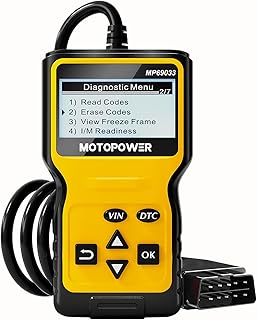
The MOTOPOWER MP69033 is a feature-rich OBD2 scanner designed for broad vehicle compatibility. It supports 9 OBD2 protocols, covering most 1996 US, 2000 EU, and Asian cars, plus newer CAN vehicles. Its 2.8″ LCD display provides clear readouts, with a built-in library for DTC lookup, data flow, real-time graphs, and I/M readiness. This device is best for drivers who want more diagnostic depth without a professional tool. Limitation: some features require interpretation by the user, and the interface is not as advanced as high-end professional scanners.
FOXWELL NT301 OBD2 Scanner

The FOXWELL NT301 is a professional-grade yet accessible OBD2 scanner ideal for DIYers and regular vehicle owners. It reads and clears check engine fault codes quickly, requiring no advanced knowledge. Practical features include one-click I/M readiness checks, a dedicated red-yellow-green LED indicator, built-in speaker feedback, and a focus on reliable repairs rather than temporary code erasure. Choose this if you want quick, confident diagnostics with clear test readiness information. A potential caveat is that deeper system diagnostics may require more advanced tools.
GEARWRENCH GWSMART05 Handheld Bidirectional Diagnostic Tool

The GEARWRENCH GWSMART05 handheld bidirectional diagnostic tool targets technicians who need portable service capabilities. It offers 31+ reset and relearn functions and includes free software updates, making it a strong choice for on-site maintenance and frequent resets. Best for professionals who require bidirectional control and a broad function set in a compact form. Limitation: software updates may require subscription continuity, and some users may find the feature set overwhelming if only basic diagnostics are needed.
FOXWELL NT530 GM Chevrolet – All Systems

The FOXWELL NT530 GM Chevrolet edition targets owners of GM vehicles seeking broader system coverage and bidirectional service. It supports maintenance functions across the vehicle’s systems and offers bidirectional flow for active tests, along with ABS, SRS, TPMS, and other module access. Best for GM owners who want an all-in-one tool for maintenance tasks beyond fault code reading. Limitation: some GM-specific functions may require firmware updates and may not be as universal as non-brand-specific tools.
Buying Guide
Key considerations when choosing a handheld car diagnostic device include: compatibility, scope of features, and ease of use. If you primarily need quick code reading and clearing, prioritize universal OBD2 scanners with a clear display and intuitive menus. For deeper diagnostics or professional service, look for bidirectional capability, multiple reset options, and live data analysis. Battery independence, screen readability in sunlight, and language support can affect daily usability. Also evaluate whether you need I/M readiness checks, freeze frame data, or vehicle information access for faster troubleshooting.
Compared to dedicated dealership tools, handheld scanners offer portability and cost-effectiveness. If you own a GM vehicle, a model with broad GM maintenance functions can save multiple visits to the shop. For hobbyists, a tool with strong DTC lookup, clear results, and straightforward code clearing provides excellent value. When selecting, consider how often you’ll use the device, the types of repairs you perform, and whether you need advanced features like live data graphs or OEM-specific functions.
FAQ
- What is an OBD2 handheld scanner? A compact device that plugs into the vehicle’s OBD II data port to read and clear diagnostic trouble codes and often provide live data and I/M readiness checks.
- Do I need bidirectional capability? Bidirectional capability allows the scanner to send commands to the vehicle’s modules for tests or resets, useful for technicians but not always necessary for casual use.
- Can these scanners work on all cars? Most universal OBD2 scanners work on vehicles built after 1996 in the US and later in other regions, but compatibility varies by protocol and vehicle year.
- Will clearing codes fix the problem? Clearing codes removes the fault indication from the dashboard if the underlying issue isn’t fixed; the code may reappear if the problem persists.
- Is live data important? Yes, live data helps interpret engine behavior and verify repair success, especially when monitoring sensors and system performance.
- How often should I update the device? Regular software updates improve compatibility and expand functions; check for updates periodically.