If you need a reliable OBD2 scanner to reset engine codes and confirm the health of your vehicle, you’re in the right place. This guide highlights five well-rounded options that are easy to use, compatible with most 1996+ vehicles, and suitable for both DIY enthusiasts and professional settings. Each pick is described with who it’s best for, what it does best, and a realistic caveat to consider before purchase.
Buyer Snapshot Table
| Product | Best For | Key Benefit | Limitations to know |
|---|---|---|---|
| ANCEL AD310 | Everyday home mechanic | Fast read/clear of codes, simple live data | Basic features; no advanced bi-directional control |
| MOTOPOWER MP69033 | Budget-conscious users | Clear 2.8″ display, broad protocol support | Single‑function display; basic data presentation |
| ANCEL AD410 | DIYers needing quick checks | Solid diagnostic tools for multiple systems | Limited bi-directional capabilities |
| VIDENT OBD2 Scanner | Progressive testers | Bidirectional tests, extensive resets, updates | More features may require learning |
| FOXWELL NT301 | Professional look for mechanics | Live data, robust check engine capabilities | Interface may feel advanced for casual users |
ANCEL AD310 Classic Enhanced OBD II Scanner

The ANCEL AD310 offers quick, reliable checks for check engine lights, reading and clearing emission-related codes, and displaying live data. It’s designed for 1996 and newer vehicles that use the OBD2 protocol. Best for home mechanics who want a compact, affordable tool that gets straight to the point without extra features. It reads diagnostic trouble codes, provides freeze-frame data, and supports I/M readiness checks to gauge whether emissions-related repairs will pass inspection.
Who it’s best for: casual to moderate DIYers who need a straightforward tool that’s easy to carry and simple to operate. Why selected: its balance of price, clarity, and fast results makes it a dependable first scanner for everyday garage tasks. One limitation: it lacks advanced bidirectional control, so you won’t be able to command the car’s systems or perform certain UDS-style tests.
MOTOPOWER MP69033 Car OBD2 Scanner
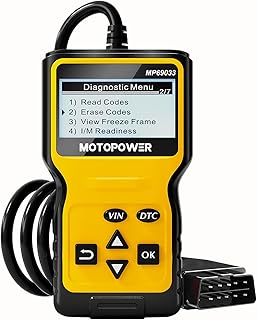
This model emphasizes broad protocol support and clear data presentation. It reads and erases codes, shows I/M readiness, freeze-frame data, and live values. It’s powered directly from the vehicle, avoiding separate batteries or chargers, which makes it convenient for frequent use. Best for drivers with a mix of older and newer cars who need a dependable all-rounder on a lean budget. Caution: the 2.8″ LCD is readable, but the display could feel small for complex data sets, especially on larger screens or low-light conditions.
ANCEL AD410 Enhanced OBD2 Scanner

The AD410 is designed for more active DIYers who want an enhanced tool capable of diagnosing multiple vehicle systems beyond basic emissions. It supports OBDII and can provide robust fault code reading across various modules. Best for users who want quicker fault isolation and more in-depth data than a basic scanner. Choose this if you regularly work on diverse vehicles and need more diagnostic depth. Limitation: like many mid-range tools, it may not offer full, premium bi-directional control in every vehicle model.
VIDENT OBD2 Scanner Diagnostic Tool

This full-featured tool targets serious testers with a professional-grade scope. It’s a 7″ screen system that includes bidirectional testing, ECU topology, and extensive reset options, plus access to thousands of live data points. Best for automotive enthusiasts or technicians who need comprehensive system checks and frequent software updates. It’s more complex, so expect a steeper learning curve and more time to master.
FOXWELL NT301 OBD2 Scanner

The FOXWELL NT301 is designed for professional-grade checks with strong live data capabilities. It handles engine data, support for a broad set of OBDII functions, and a reliable code-reading experience. Best for mechanics who require a robust, repeatable diagnostic process and meaningful data streams that assist in decision-making. Caution: advanced users will find the interface feature-rich, which can slow down quick scans for casual users.
Buying Guide
What features matter most when choosing an OBD2 scanner reset tool?
- Vehicle compatibility: Ensure the scanner supports OBDII and the year range of your vehicles. Most options here do, but always confirm if you own older or imported cars.
- Code reading and clearing: Look for quick-diagnose capabilities to read DTCs, interpret freeze-frame data, and clear codes after repairs.
- Live data and I/M readiness: Real-time data helps diagnose problems, while I/M readiness shows if emissions tests will pass.
- Display and usability: A clear, legible display (LCD or color screen) improves usability, especially in poor lighting or cramped spaces.
- Power source: Most devices draw power from the vehicle; some models require no separate battery, which can simplify use.
- Advanced features: Bi-directional control and ECU topology access are useful for professional work but may not be necessary for casual users.
How to choose by user scenario
- Beginner home mechanic: Start with AD310 or MP69033 for straightforward code reading and clearing.
- Budget-focused DIYer: MP69033 offers essential features at a lower cost with a readable display.
- Pro-level use or frequent updates: VIDENT or FOXWELL NT301 provide stronger diagnostic depth and ongoing updates.
Usage tips for best results
- Install and update the scanner’s software when available to access the latest DTC definitions.
- Consult the vehicle’s service manual for long-term repair plans after identifying trouble codes.
- Keep the device’s cable or connector clean to avoid intermittent connection issues.
- Avoid relying on a single code as the sole indicator of a problem; use live data to confirm symptoms.
Frequently Asked Questions
- What is an OBD2 scanner used for? – It reads diagnostic trouble codes from the vehicle’s onboard computer and can clear them after repairs.
- Do I need a professional-grade scanner? – For routine checks, a consumer-grade scanner is sufficient; professionals may require bidirectional controls and more comprehensive data.
- Will these work with all 1996+ cars? – Most listed options support a wide range of 1996+ OBDII vehicles, but check vehicle-specific compatibility as some models may vary.
- Can I use these without a car battery? – Most rely on vehicle power through the OBDII port; some models disclaim the need for separate power sources.
- Is bi-directional control necessary for basic maintenance? – Not for basic diagnostics. Bi-directional control is more useful for advanced testing and component actuation.
- How often should I update the device? – Regular software updates improve code databases and compatibility with newer vehicles; check vendor guidance.