Find clarity quickly with reliable OBD2 scanners that fit a range of needs—from casual DIY maintenance to professional diagnostic work. This guide highlights five top-rated options, explains who each is best for, and shows how to choose the right tool for your vehicle and skill level. The list targets common tasks like reading and clearing fault codes, viewing live data, and performing basic bi-directional testing.
| Product | Best For | |
|---|---|---|
| ANCEL AD310 | Budget-friendly, quick error code checks | OBD2, reads/clears codes, CAN diagnosis, 1996+ vehicles |
| FOXWELL NT301 | Live data and detailed diagnostics for DIY mechanics | Live data, OBD2, check engine light focus |
| Innova 5610 | Bi-directional testing, broader vehicle coverage | Bidirectional, advanced diagnostics, US-based support |
| ANCEL FX2000-US | 4-system overview (engine, ABS, SRS, transmission) | Full OBDII, live data, four systems |
| MOTOPOWER MP69033 | Simple, reliable OBD2 reading for all 1996+ cars | CAN diagnostic, all OBDII, basic fault codes |
Notes: The selections emphasize tools that balance feature depth with ease of use. When choosing for a professional workshop, consider models with broader bidirectional capabilities and robust tech support. For casual home use, prioritize straightforward code reading and live data streaming to quickly diagnose common issues.
ANCEL AD310 Classic Enhanced OBD II Scanner

The ANCEL AD310 is a compact, user-friendly diagnostic tool designed for quick fault-code reading and clearing on 1996 or newer OBD2 vehicles. Best for DIYers who need fast checks without a learning curve, this tool focuses on essential engine fault codes and basic CAN diagnostics to identify why the check engine light is on. It suits homeowners, hobbyists, and auto enthusiasts who want reliable on-the-spot readings without extra features that complicate operation.
Why it’s selected: Simple interface, broad compatibility, and a practical feature set for routine maintenance. Best for establishing a baseline diagnosis before deciding whether a more advanced scan is necessary.
Caution: It provides core OBD2 functionality but does not include extensive live data or advanced bi-directional testing found in higher-end models.
FOXWELL NT301 OBD2 Scanner

The FOXWELL NT301 focuses on live data and professional-grade diagnostic capabilities within a compact handheld unit. It’s well-suited for DIY mechanics who want to monitor engine performance in real time while diagnosing check engine lights. Its emphasis on live data makes it easier to interpret how different engine parameters react under varying conditions, supporting more informed maintenance decisions.
Why it’s selected: Clear emphasis on live data and ease of use, enabling users to observe real-time engine behavior and pinpoint issues more accurately than basic code readers.
Caution: It lacks some advanced bi-directional capabilities found in higher-tier scanners, which can limit its use for complex diagnostics or factory-specific tasks.
Innova 5610 OBD2 Bidirectional Scan Tool

The Innova 5610 is positioned for users who want more than basic code reading. It offers bidirectional capabilities to perform functional tests and retrieve more granular vehicle data. This makes it suitable for semi-professional settings or serious hobbyists who want to understand systems beyond the engine, including emissions and monitoring data. Updates and US-based technical support add value for ongoing reliability.
Why it’s selected: The bidirectional feature set supports deeper diagnostics and potential command execution for certain vehicle systems, giving a clearer picture of what needs maintenance or repair.
Caution: Bidirectional testing can require more knowledge to interpret results correctly, and some functions may depend on vehicle compatibility and software updates.
ANCEL FX2000-US OBD2 Scanner

The ANCEL FX2000-US provides a four-system overview by covering Engine, ABS, SRS (airbag), and Transmission alongside full OBDII functionality and live data. This makes it a strong mid-range option for users who want a more holistic look at vehicle health without stepping up to high-end professional tools. It’s a practical choice for those who want cross-system insights during routine maintenance or troubleshooting.
Why it’s selected: Four-system coverage helps identify cross-system issues that might impact safety or drivability, offering a broader diagnostic context than engine-only tools.
Caution: Although feature-rich, it may still fall short for advanced factory-level diagnostics on newer or highly specialized vehicles.
MOTOPOWER MP69033 OBD2 Scanner
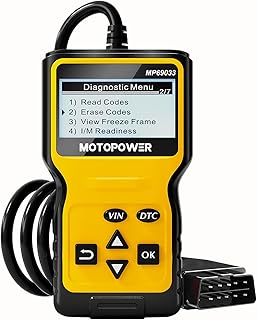
The MOTOPOWER MP69033 is a straightforward OBD2 scanner designed for universal compatibility with all OBD II vehicles since 1996. It excels as a reliable entry point for reading and clearing engine fault codes and viewing essential live data. This tool is best for users who want a simple, dependable device that performs the core job well without extra complexity.
Why it’s selected: Strong all-around compatibility and a focus on essential diagnostics make it a solid baseline choice for many drivers and hobbyists.
Caution: It may offer fewer advanced features than premium models, which can limit its use in more demanding diagnostic scenarios.
Buying Guide
What should I consider when buying a diagnostic scanner?
Vehicle compatibility is the first factor. Ensure the tool supports your make, model, and year, especially for vehicles with newer OBD protocols or specific manufacturers’ protocols.
Feature depth matters. If you only need to read and clear codes, a basic model may suffice. For live data, bidirectional testing, or ABS/SRS diagnostics, select models with those capabilities.
Ease of use. For beginners, a simple interface with clear code explanations helps speed up the diagnostic process. For pros, a more robust interface and broader data access can save time on complex repairs.
Software updates and support. OBD tools rely on firmware and software updates to stay compatible with new vehicle technologies. Look for models with regular updates and accessible support.
Budget vs. need. Higher-end tools offer more features but may not be necessary for casual users. Prioritize what you will actually use and whether you require cross-system testing or live data streams.
How to use a diagnostic scanner effectively
Start with a code scan to identify the fault. Note the DTCs (diagnostic trouble codes) and clear codes only after performing necessary repairs or when the issue is resolved.
Check live data to observe sensor readings, pressure, temperatures, and RPMs. Use this data to correlate symptoms with potential failures rather than relying on codes alone.
For complex issues, consider bidirectional testing if your tool supports it. Use service manuals or vehicle-specific information to interpret commands and responses accurately.
Common questions
- What is an OBD2 scanner and does my car need one? A universal tool that reads engine codes and data from vehicles manufactured after the mid-1990s. Most gasoline-powered cars sold in the U.S. since 1996 are OBD2 compliant.
- Do I need live data or only code reading? Live data helps diagnose intermittent issues and understand engine performance, while code reading identifies fault codes that point to a problem.
- Are bidirectional scanners worth it? They offer more control over tests and can command certain vehicle systems, which is beneficial for more advanced diagnostics.
- Will a higher-end scanner automatically mean better results? Not always. Choose based on your needs, the vehicles you own, and how deep you want to diagnose issues.
- Can I use these tools on diesel engines or just gasoline? Many OBD2 scanners work with both, but some features may be limited on certain engines or manufacturers.
- Do scanners require internet access? Most basic tools do not need internet, but some features like software updates or cloud-based support may require connectivity.