Answer: A touch screen backup camera system with CarPlay/Android Auto delivers clear rear visibility plus smart navigation and hands-free control. This guide highlights five top options that suit different buyers: tech-savvy commuters, RV and truck users, daily drivers seeking mirror-link versatility, and owners needing seamless wireless integration. Each pick is evaluated for ease of use, screen size, compatibility, and safety features to help you choose.
Summary at a glance:
| Product | Best For | Key Benefit | Limitations |
|---|---|---|---|
| HAUXIY 9″ CarPlay Screen | Tech-focused drivers | OTA updates, wireless CarPlay/Android Auto | Requires phone connection for maps |
| 7″ Portable CarPlay Screen | All vehicle types | Mirror link and Bluetooth/WiFi setup | Smaller display |
| BuonaIdea 7″ Car Screen | Ease of use enthusiasts | Wireless CarPlay/Android Auto, voice control | Overview may vary by vehicle |
| RV Backup System 10.36″ | Recreational vehicles and work trucks | 4-channel, waterproof cameras, night vision | Wired installation |
| IIWEY iK7 10″ Wireless Screen | Premium display lovers | Wireless CarPlay/Android Auto, 4K dash cam combo | Higher setup complexity |
Product Showcases
HAUXIY 9-Inch Wireless CarPlay Screen

- CarPlay and Android Auto via Bluetooth and WiFi.
- Real-time GPS navigation with voice control; supports Google Maps and Waze when connected to a phone.
- Over-the-air (OTA) updates keep the system compatible with evolving car tech.
Best for: Tech-forward buyers who want a larger, wireless CarPlay experience and automatic firmware updates. This model emphasizes ongoing compatibility and real-time navigation, useful for drivers who rely on maps and quick access to calls and messages. Limitation: Maps and apps need your phone connection for full functionality.
Portable 7-Inch CarPlay/Android Auto Screen

- 7″ HD touch screen with wireless CarPlay and Android Auto.
- Mirror Link and Bluetooth 5.2; backup camera support; AUX and FM transmitter.
- Easy plug-and-play setup with cigarette-lighter power supply.
Best for: Drivers seeking a compact, flexible solution that works across most vehicles without major changes to the dashboard. Limitation: Smaller display may be less ideal for navigation at a glance.
BuonaIdea Wireless CarPlay Screen, 7-Inch

- Wireless CarPlay/Android Auto with voice control via Siri or Google Assistant.
- Phone Mirror Link supports IOS and Android; supports video streaming and GPS mirroring after initial setup.
- Plug-and-play fit for most cars; keeps the original radio intact.
Best for: Users who want a simple, wireless CarPlay setup with mirror-link for multimedia. Limitation: Vehicle compatibility can vary; some features depend on first-time pairing.
RV Backup Camera System With 10.36″ Touch Screen

- 10.36″ touch screen with 4-channel wired cameras.
- IP69 waterproof rear and side cameras; supports night vision and DVR loop recording.
- Designed for RVs, trucks, trailers, and buses needing wide coverage and safety.
Best for: Vehicle owners needing multi-camera coverage for larger vehicles. Limitation: Wired installation is more involved than wireless options.
IIWEY iK7 10-Inch Wireless CarPlay Screen
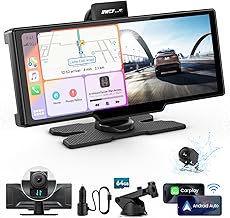
- Wireless Apple CarPlay and Android Auto with 4K dash cam integration.
- 10″ touchscreen with 1600×600 resolution and 60Hz; includes GPS and voice control.
- Mirror Link and backup camera support; comes with a 64GB card for storage.
Best for: Buyers who want a premium, large display with strong multimedia and navigation integration. Limitation: Setup can be more involved, and the system relies on wireless connections for CarPlay/Android Auto.
Buying Guide
What to consider when choosing a touch screen backup camera system
- Display size and readability: Larger screens make navigation and rear viewing easier, but may require more installation space.
- Connectivity: Wireless CarPlay/Android Auto offers convenience; wired camera connections can be more reliable in some setups.
- Camera coverage: For RVs, trucks, or trailers, multi-camera (4-channel) systems improve blind-spot coverage.
- OTA updates and software support: Systems with OTA updates stay updated with new features and compatibility.
- Installation complexity: Portable units are easiest; built-in or dash-mounted units may require professional installation.
- Mirror Link and video playback: Some models support streaming apps and video, which can be a distraction; prioritize driving safety.
- Voice control: Siri/Google Assistant integration enables hands-free operation for maps, calls, and messages.
Should you choose wireless or wired systems?
Wireless systems tend to be easier to install and remove, ideal for renters or temporary setups. Wired systems can offer more stable video quality and are often preferred for larger vehicles or permanent installations where a fixed screen is desired.
What types of buyers benefit most from these products?
- Frequent travelers and tech enthusiasts: benefit from OTA updates and seamless CarPlay/Android Auto integration.
- RV and truck operators: require multi-camera views and robust night vision for safety.
- Casual drivers seeking simple upgrades: prefer smaller, plug-and-play options with built-in mirrors and easy setup.
Maintenance and safety notes
- Keep firmware up to date to ensure compatibility with latest smartphones.
- Test backup camera systems in a safe area before relying on them on the road.
- Follow vehicle manufacturer guidelines when wiring or mounting screens to avoid interference.
FAQ
- What is CarPlay and Android Auto compatibility? – These features mirror your phone’s apps and navigation on the touchscreen, using voice input for hands-free control.
- Do these systems require professional installation? – Some plug-and-play items are easy to install; more complex setups, especially for RVs and multi-camera systems, may require professional help.
- Can I use backup cameras without internet? – Yes, the cameras themselves operate without internet; GPS navigation features may need phone connectivity for maps.
- Are wireless CarPlay screens reliable? – They can be reliable with a strong Bluetooth/WiFi connection and proper pairing, but performance varies by model and vehicle.
- Do these units support video playback while driving? – Some models support video playback when parked; many manufacturers restrict video while the vehicle is in motion for safety.
- What should I prioritize when buying? – Prioritize screen size, camera coverage, wireless vs. wired setup, and OTA update capability based on your driving needs.