The best OBD2 laptop code reader connects your vehicle’s onboard computer to a laptop for comprehensive diagnostics, live data, and code management. This guide highlights five reliable options that work well with most 1996 and newer vehicles, helping different buyers choose the right tool for DIY diagnostics, professional workups, or offsite data logging. The top picks below are suited for: casual DIYers who want quick fault code checks, tech-savvy users needing live data streams, and professional enthusiasts who customize or troubleshoot vehicle systems.
Summary table of selected products:
- ANCEL AD310 Classic Enhanced Universal OBD II Scanner – Best overall beginner-friendly option.
- MOTOPOWER MP69033 Car OBD2 Scanner – Best for broad protocol support and multilingual display.
- MOCATEC USB OBD Adapter for FORScan – Best for Ford/Lincoln/Mercury and Mazda power-user customization.
- FOXWELL NT301 OBD2 Scanner – Best for fast, thorough engine diagnostics and readiness checks.
- ELM327 OBD2 Adapter (USB) – Best for Windows-based, USB-only setups and broader data access.
ANCEL AD310 Classic Enhanced OBD II Scanner

The ANCEL AD310 is an easy-to-use universal OBD II scanner designed for 1996 and newer vehicles. It reads and clears fault codes and provides basic freeze-frame data. Best for beginners who want a straightforward tool without a laptop dependency. It’s a strong choice for home mechanics who need quick diagnostics and simple code clearing on a single vehicle at a time. A potential limitation is that more advanced live data and bi-directional controls may be outside its scope, so users needing deeper module interaction should consider other options.
MOTOPOWER MP69033 OBD2 Scanner
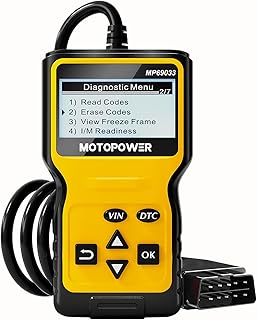
Best for users who need broad protocol support and a multilingual interface. The MP69033 covers 9 protocols, including most US, EU, and Asian cars, and supports languages like English, German, Dutch, Spanish, French, and Italian. It offers a 2.8″ LCD display for on-device readings and provides features such as code reading/erasing, I/M readiness, live data, and vehicle information. Choose this if you want a versatile scanner that remains functional across multiple vehicle makes and regions. A caveat is that some advanced OEM-specific codes may require additional software in other configurations.
MOCATEC USB OBD Adapter for FORScan

The MOCATEC USB OBD Adapter targets Ford, Lincoln, Mercury, and Mazda enthusiasts who want to unlock deeper vehicle configurations with FORScan software. It enables hidden factory configurations, real-time data streams, and advanced customizations that go beyond standard code reading. Best for users who need personalization and diagnostic depth, especially within Ford-family vehicles. A limitation is that FORScan-based capabilities can require additional software setup and vehicle data access might vary by model year.
FOXWELL NT301 OBD2 Scanner

The FOXWELL NT301 is a professional-grade tool designed for quick engine fault code reading and clearing, with an emphasis on accuracy and reliability. It offers one-click diagnostics, a dedicated I/M readiness function, and clear LED indicators to help determine pass/fail status before an inspection. Best for DIYers who want fast results and for those who perform routine checks ahead of shop visits. A consideration is that NT301 focuses on engine diagnostics and may not provide full bi-directional control across all modules like higher-end professional scanners.
ELM327 USB OBD2 Adapter

The ELM327 USB OBD2 adapter provides USB connectivity for Windows-based setups, offering broad compatibility with many OBD-II applications. It’s best for users who prefer a computer-centric workflow and want to leverage software on a laptop for more detailed data analysis. Choose this if you want a flexible, cost-effective solution that can pair with multiple diagnosis programs. A limitation is that performance relies heavily on compatible software; not all apps will deliver the same feature depth.
Buying Guide
What to consider when choosing an OBD2 laptop code reader:
- Compatibility: Ensure it matches your vehicle’s year, make, and model. Multi-protocol support is helpful for mixed fleets.
- Data depth: Decide if you need basic fault code reading/erasing or advanced live data, freeze frames, and bidirectional controls.
- Platform: Some devices work standalone, while USB adapters require a laptop and compatible software.
- Ease of use: Beginner-friendly interfaces with clear error explanations help faster repairs.
- Expansion potential: FORScan or OEM-specific tools unlock deeper customization for compatible brands.
Frequently Asked Questions
- What is an OBD2 laptop code reader used for?
- Is it better to use a USB adapter or a dedicated handheld scanner?
- Can these tools diagnose all car systems?
- Do I need special software for FORScan?
- Will these tools clear codes permanently?
To read and clear diagnostic trouble codes from a vehicle’s computer and to view live sensor data via a compatible laptop or handheld device.
USB adapters paired with software offer deeper analysis and customization, while handheld scanners provide quick, portable diagnostics.
Most can access engine and basic emission-related systems; more advanced modules (ABS, airbag, transmission) require higher-end tools or software.
Yes. FORScan is required to unlock Ford/Lincoln/Mercury/ Mazda-specific features with compatible hardware.
They clear codes after repairs; if the underlying issue remains, the codes may reappear when you drive the vehicle again.