Answering your search for a reliable backup camera with parking assist, this guide highlights five top options suited for different drivers. Whether you drive a car, SUV, truck, or RV, these systems help you park with confidence. The best picks include front-and-rear view capabilities, night vision, and smart connectivity. Each entry notes who it’s best for and why it stands out, plus a practical caveat to consider.
| Product | Best For | Key Benefit |
|---|---|---|
| WOLFBOX G840S 12″ 4K Mirror Dash Cam | Drivers wanting front/rear dual cameras with GPS | Large 12″ display and 4K front recording |
| LeeKooLuu 15-Minute Plug & Play Backup Camera | New installers and quick upgrades | Fast, simple 15-minute install with durable weatherproofing |
| 2K Backup Camera Kit, 7″ Monitor | Budget-friendly upgrade with clarity | True 2K image on a larger monitor, easy wiring |
| YEOIZO Strong Magnetic Wireless Backup Camera | Wireless, no-drill installation for various trailers | Rechargeable, magnet-based mounting for quick setup |
| WOLFBOX G930 10″ 4K Mirror Dash Cam | Multi-camera mirror with app-based access | 4K front with 1080P rear and robust WiFi |
WOLFBOX G840S 12″ 4K Mirror Dash Cam

The WOLFBOX G840S combines a large 12-inch display with a front 4K camera and a rear view, offering GPS and 5.8GHz WiFi for quick downloads via the companion app. Best for drivers who want a high-resolution main view plus a rear backup feed to assist parking and lane changes. The setup supports both front and rear cameras for comprehensive coverage. Caution: Heavier system requires space in the mounting area; ensure your vehicle’s wiring can accommodate the dual-camera configuration.
LeeKooLuu 15-Minute Easy to Install Backup Camera

This kit prioritizes a quick, tool-free installation with plug-and-play wiring and an IP69-rated waterproof housing. It delivers HD 1080P imagery and stable signal transmission to minimize delays. Best for new car owners or DIY enthusiasts who want a reliable, straightforward upgrade. Choose this if you value a simple install over a feature-rich but complex system. Limitation: Fewer advanced features like 4K or GPS compared to higher-end models.
2K Backup Camera Kit, 7 Inch Monitor
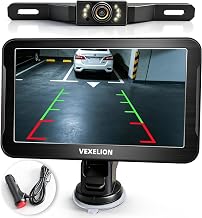
This kit emphasizes a true 2K sensor resolution and a large 7-inch monitor, with plug-and-play installation: a single cable connects the monitor to the camera for under 15 minutes. Best for drivers who want sharper rear visibility and a sizable display without complicated wiring. Better for hitching trailers or navigating tight spaces. Limitation:May lack premium features like built-in GPS or advanced night vision found on higher-tier units.
YEOIZO Strong Magnetic Wireless Backup Camera

This wireless option enables no-wiring, no-drill installation using a strong magnetic mount. Best for renters or temporary setups on trailers, goosenecks, or fifth wheels where a quick, reversible solution matters. The rechargeable design means you’ll need to manage battery life and recharging timing. Limitation: Wireless connections can be more susceptible to interference in crowded wireless environments.
WOLFBOX G930 10″ 4K Mirror Dash Cam

The G930 model provides a 4K front camera and a 1080P rear camera within a smart mirror display, including WiFi connectivity for easy downloads. Best for drivers seeking a high-resolution front view with integrated parking monitoring. The built-in WDR helps balance lighting in high-contrast conditions. Limitation: The 4K front may require more processing and storage than lower-resolution options; ensure adequate memory and power supply in your vehicle.
Buying Guide: Key Purchase Considerations
- Resolution and coverage: Do you want 4K front video, a separate rear feed, or both? Higher resolution improves detail when reversing or recording incidents.
- Display size and mounting: Is a larger mirror display beneficial for your cab or dash area? Consider space and compatibility with your current mirror or dashboard.
- Wiring vs. wireless: Are you comfortable with a wiring install, or do you prefer wireless (magnetic or WiFi) setups?
- Night vision and low-light performance: How important is clear imagery in dawn, dusk, or poorly lit areas?
- Connectivity: Do you value app access, GPS logging, or the ability to download and share footage quickly?
- Durability: Look for IP ratings (water and dust resistance) and operating temperature ranges for all weather use.
- Power and compatibility: Check vehicle power options (cigarette lighter vs. hardwire) and compatibility with your vehicle’s electrical system.
Frequently Asked Questions
- What is the difference between 4K and 2K backup cameras for parking assist?
– 4K offers higher detail for the front camera, while 2K provides clear rear visibility with potentially simpler setup and data handling. - Do I need GPS in a backup camera system?
– GPS is helpful for logging location and route data, but not essential for basic parking assist. - Are wireless backup cameras reliable in all weather?
– Wireless may be more convenient, but signal stability can vary with interference and distance; ensure you choose a system rated for all-weather use. - Can I install these cameras myself without professional help?
– Many kits advertise plug-and-play installation; follow the manufacturer’s wiring diagrams and ensure proper power sources and weather sealing. - Will these cameras fit any vehicle?
– Most kits are designed for a range of cars, trucks, and SUVs, but verify mounting compatibility and monitor size with your vehicle before purchase. - What is a parking assist feature?
– Parking assist includes guidelines, distance cues, or sensors that help you maneuver safely while reversing.