Find the right car engine fault diagnostic scanner to quickly identify and clear check engine light codes. This guide highlights five reliable options suited for different drivers, from casual car owners to DIY enthusiasts and professional mechanics. Each pick is evaluated for ease of use, key features, and practical limitations.
Overview: the following table summarizes the five selected scanners, who they’re best for, and why they stand out.
| Product | Best For | |
|---|---|---|
| ANCEL AD310 | Beginners and everyday drivers | Compact design, quick DTC read/clear, straightforward operation |
| MOTOPOWER MP69033 | Budget-conscious DIYers | Wide protocol support, 2.8″ display, multi-language |
| FOXWELL NT301 | Owners who want reliable one‑button checks | One‑click read/clear, I/M readiness, built‑in feedback indicators |
| XTOOL D6S | Advanced users and professionals | Full system diagnostics, 30 maintenance services, CAN FD support |
| ANCEL AD410 | Beginners needing detailed guidance | Extensive DTC library, live data, broader OBD2 functions |
ANCEL AD310 Classic: Easy Start for OBD2 Cars

The ANCEL AD310 is a compact, entry-level OBD II scanner designed to quickly identify emission-related trouble codes and clear them after repairs. It provides live data, freeze frame, I/M readiness, and memory data access to help verify a repair. It’s well-suited for drivers who want a straightforward tool to diagnose why the check engine light is on without requiring advanced knowledge. A notable benefit is its battery-free operation, drawing power directly from the vehicle’s OBD II port.
Best for: casual drivers and weekend mechanics who need fast, simple results without extra features. Why selected: it’s a highly portable, reliable option with a clear display and intuitive controls. Limitation: it may lack deeper, system-wide diagnostics found in higher-end tools.
MOTOPOWER MP69033: Multilingual OBD2 for Many Cars
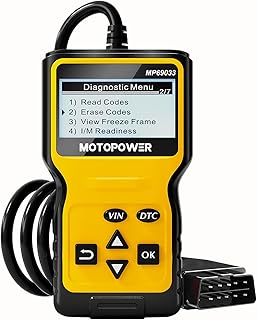
The MP69033 offers broad compatibility with nine OBD II protocols and supports a wide range of vehicles since 1996. It includes a 2.8-inch LCD with backlight for easy viewing of live data, DTC lookup, read/erase codes, I/M readiness, and vehicle information. The device is powered via the vehicle’s OBD port, which makes it convenient for on‑the‑spot checks. Best for: users who want a versatile tool at a reasonable price and value multilingual support. Limitation: the display size may feel small for dense data streams, and some languages may be limited to the listed six, depending on updates.
FOXWELL NT301: Professional-Lit Real-Time Insight

The NT301 is popular for its balance of professional capabilities and user-friendly operation. It reads and clears engine fault codes quickly, supports one-button I/M readiness checks, and provides clear audio and visual feedback indicating pass/fail status. It’s designed for DIYers who want dependable results before heading to a shop, helping to verify repairs after work is done. Best for: those who prioritize speed, reliability, and simple diagnostic confirmation. Limitation: it focuses on essential modules and may not cover every advanced system in all vehicles.
XTOOL D6S: Full-System, 30 Maintenance Services

The D6S delivers a dealer-level experience with full-system diagnostics, including engine, ABS, SRS, transmission, EPB, and more. It supports CAN FD and FCA AutoAuth, along with 30 maintenance/restoration functions that help with relearning and resets. This makes it a strong choice for families, hobbyists, and professionals who need deeper insights and a broader maintenance toolkit in one device. Best for: users who want comprehensive, all‑system coverage. Limitation: availability of certain functions varies by vehicle; VIN input may be required to confirm compatibility.
ANCEL AD410 Enhanced OBD2 Scanner

The AD410 extends the capabilities of a standard OBD2 scanner with a large set of built-in DTC lookups (over 42,000), enabling more precise code definitions. It provides live data, freeze frame, I/M readiness, and a broader range of OBD2 functions, making it suitable for users who want richer diagnostics without moving to a higher-priced, professional-grade tool. Best for: beginners who want deep code definitions and actionable guidance. Limitation: the extensive DTC database can require more familiarity to interpret complex results.
Buying Guide: Key Factors to Consider
- Vehicle coverage: Ensure the scanner supports your vehicle’s year, make, and model. Some devices emphasize broad protocol support, while others target simple, quick reads.
- Diagnostics depth: Decide if you need only engine codes or full-system diagnostics (ABS, SRS, transmission, EVAP, etc.).
- Live data and readings: Look for real-time data streams, freeze frame, and I/M readiness to verify repairs and pass emissions tests.
- User experience: A clear display, intuitive menus, and helpful guidance reduce confusion for new users. Consider language support if needed.
- Power source: Most units draw power from the vehicle’s OBD port; note whether any device requires batteries or external power for operation.
- Maintenance and updates: Some tools offer software updates or data libraries. Factor in future support if you want ongoing access to new codes.
Frequently Asked Questions
- What is an OBD II scanner used for?
It reads and clears diagnostic trouble codes from a vehicle’s onboard computer, helping identify the cause of the check engine light and verify repairs. - Do I need a professional-grade scanner?
For basic code reading and simple repairs, entry‑level scanners are often sufficient. Advanced users may prefer full‑system diagnostics and maintenance functions offered by higher‑end models. - Can these scanners work on all vehicles?
Most modern scanners support common protocols with varying levels of compatibility. Always confirm year, make, and model compatibility before purchasing. - Will a scanner remove the check engine light permanently?
No. Clearing codes removes the light only after the underlying issue is addressed. If the problem persists, codes may reappear. - Do scanners require a data subscription?
Some devices offer updates via subscriptions or app services, but many basic models work without ongoing fees. - Is live data essential for diagnostics?
Live data helps diagnose intermittent issues and verify repairs, but it’s not strictly necessary for simple code reads.