Looking for an affordable double din car stereo with built-in navigation? This guide highlights practical options that fit tight budgets while delivering reliable navigation, Bluetooth hands-free, and media playback. The top picks are suited for daily commuting, road trips, or upgrading an older vehicle. Each option emphasizes ease of use, offline map support where available, and straightforward installation. Below is a quick snapshot of five strong choices, followed by in-depth product sections and a buyer’s guide.
| Product | Navigation | Android Auto / CarPlay | Best For |
|---|---|---|---|
| Leadfan 7inch Car Stereo | GPS Navigation (built-in) | Android Auto / Mirror Link | Budget-friendly daily driver upgrades |
| Wireless Carplay Double Din | GPS Navigation | Wireless CarPlay / Android Auto | Smartphone-first users seeking wireless integration |
| Haudio 7 Inch Double Din | GPS Navigation | Wireless Apple CarPlay & Android Auto | Modern features with offline maps |
| Haudio 10.1 Inch Android 13 | GPS Navigation | CarPlay / MirrorLink | Front-end infotainment with large display |
| 4+64GB Android 15 10.1 | GPS Navigation | Wireless CarPlay / Android Auto | All-in-one upgrade with flexible connectivity |
Leadfan 7inch Car Stereo Double Din

The Leadfan 7-inch double din system combines a touchscreen radio with GPS navigation, a backup camera input, and multimedia playback. It supports Bluetooth calling, FM/MP3/MP4, USB, and aux input. This option is best for first-time buyers seeking a low-cost unit with essential navigation and decent media features. The built-in navigation helps reinforce route planning for daily commutes and weekend trips. Caution: Basic processing power may limit multitasking when running multiple apps.
Who it’s best for: Budget-conscious buyers upgrading an older car who want straightforward navigation and hands-free calling without extra wireless complexity.
Why selected: It delivers essential navigation, backup camera support, and multiple media options at a low price point, making it a practical entry choice for a first-time upgrade.
Limitations: May show modest performance with heavy app use; consider this if you routinely run many apps simultaneously.
Wireless Carplay Double Din Car Stereo
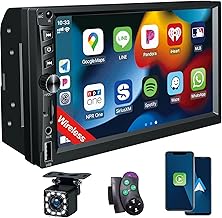
This 7-inch unit emphasizes wireless CarPlay alongside GPS navigation, Bluetooth 5.1, FM radio, and a backup camera. It supports Android Auto and voice control, with USB/AUX/TF/SWC inputs. Best for users who prefer a wireless CarPlay experience and simple connectivity without running cables. Caution: Wireless CarPlay performance may vary with vehicle compatibility and signal strength.
Who it’s best for: Smartphone-centric drivers who want a clean, cable-free CarPlay setup and reliable navigation on the road.
Why selected: The model prioritizes wireless integration, a responsive touchscreen, and a complete infotainment package in one affordable package.
Limitations: Some users may want more RAM or storage for offline apps; device performance depends on app usage.
Haudio 7 Inch Double Din With Wireless CarPlay
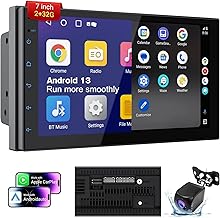
Haudio’s 7-inch double din offers wireless Apple CarPlay and Android Auto, backed by Android 13 with 2GB RAM and 32GB ROM. It features GPS navigation, FM/AM with RDS, and a touchscreen IPS panel. The backup camera readiness adds safety, while offline map support ensures navigation even without internet. This option is best for drivers who want a modern OS, ample storage, and a responsive display. Caution: The entry-level RAM may limit heavy multitasking in map-heavy scenarios.
Who it’s best for: Users who want a modern Android-based head unit with good offline navigation capability and a quality display.
Why selected: The combination of wireless CarPlay, Android Auto, and offline navigation makes it a strong all-around upgrade for mid-budget installs.
Limitations: 2GB RAM means slower app switching when many apps run at once; keep essential apps open for best performance.
Haudio Double Din Android 13 Car Stereo Receiver

This Haudio model features a 10.1-inch universal HD touchscreen, built-in GPS, and backup camera compatibility. It supports CarPlay, Android Auto, Bluetooth 4.1, and is compatible with MirrorLink for a broad range of devices. The larger display is a clear advantage for navigation readability and media control, especially on longer drives. Caution: Some models may require more space for installation in smaller dashboards.
Who it’s best for: Drivers wanting a larger display and a robust suite of car infotainment features in one unit.
Why selected: The wide-screen experience and integrated navigation make it a compelling upgrade for comfort and usability in daily driving.
Limitations: Bluetooth version 4.1 is dated compared to newer variants; plan for compatibility with your devices.
4+64GB Android 15 Double Din

This unit runs Android 15 on a 10.1-inch IPS rotatable screen with built-in DSP, Bluetooth 5.2, SWC, GPS navigation, and a backup camera. Wireless CarPlay and Android Auto provide flexible smartphone integration. Best for users who want a high-connectivity head unit with a rotatable screen for optimal viewing angles on the go. Caution: With higher feature set, power consumption and head unit warmth may increase during long sessions.
Who it’s best for: Tech-savvy buyers who want the latest Android experience, strong connectivity, and a large, adjustable display.
Why selected: It combines advanced connectivity with a practical screen orientation, suitable for trucks, SUVs, and larger dashboards where screen size benefits navigation and media control.
Limitations: Higher feature density can lead to more complex setup for some vehicles; ensure dash space and harness compatibility before purchase.
Buying Guide: Key Considerations For A Smart, Affordable Upgrade
- Navigation reliability: Check whether the unit relies on offline maps or requires an internet connection for GPS. Offline maps are valuable for areas with weak data signals.
- Smartphone integration: Consider whether you prefer wired or wireless CarPlay/Android Auto. Wireless options offer easier setup but depend on device compatibility and range.
- Display and usability: A larger screen improves map readability and control. IPS panels with good viewing angles help in bright daylight driving conditions.
- Processing power and memory: More RAM and storage enable smoother multitasking, quicker map updates, and faster app launches during trips.
- Camera support: Backup camera readiness enhances safety. Confirm whether the unit includes cable harnesses or requires separate adapters.
- Audio and features: Look for Bluetooth quality, FM/AM options, USB/aux inputs, and SWC (steering wheel control) compatibility for easier operation.
- Installation fit: Verify the device size (7″, 10.1″, etc.) and dash compatibility. Larger displays may require dash spacers or professional installation in some vehicles.
- Software updates: Some devices run Android or proprietary OS versions. Check the manufacturer’s policy on firmware updates for navigation and apps.
- Value vs. risk: For a low-budget upgrade, prioritize essential navigation, safety features, and reliable connectivity over premium extras that may not be fully utilized.
Frequently Asked Questions
- What is the main benefit of a double din with navigation? It provides built-in route guidance, a larger display, and often easier access to media and hands-free calling while driving.
- Do these units require internet for navigation? Many include offline maps or offline navigation options; others may rely on online map services for updates and routing.
- Is wireless CarPlay worth it? Yes for convenience, as it removes the need to connect via cable and allows quicker access to apps and navigation.
- Will a larger screen fit in my car dashboard? Size compatibility depends on dash depth and mounting space; verify the device width and installation kit requirements before purchase.
- Do these units support backup cameras? Most listed options are compatible with backup cameras, but check that the necessary camera cable harness is included or available separately.
- Can I install these myself? Basic installs are DIY-friendly for many vehicles, but some dashboards may require professional installation for a clean fit and proper wiring.