If you’re shopping for a reliable car scan tool, you want a device that quickly reads and clears engine codes, shows live data, and works across a wide range of vehicles. The top picks below suit different buyers—from DIYers and weekend mechanics to those who want simple, battery-free operation and clear guidance. Each choice is evaluated for ease of use, supported protocols, and practical limits to help you pick confidently.
Summary table of selected products:
- ANCEL AD310 — Best for compact, portable reliability and fast code reading.
- MOTOPOWER MP69033 — Best for broad protocol support and color LCD readability.
- FOXWELL NT301 — Best for quick one-click engine light diagnosis and CEL clearing with safe reset.
- VDIAGTOOL VD10 — Best for DIYers who want a bundled, all-in-one code reader with robust DTC definitions.
- FOXWELL NT604 Elite — Best for multi-system scans (ABS/SRS) and advanced live data.
ANCEL AD310 Classic Enhanced OBD II Scanner

The ANCEL AD310 is a compact, entry-level OBD II scanner designed for fast fault code reading and clearing. It works with 1996 or newer vehicles using OBD2 protocols and provides access to emission system codes, live data, freeze frame, I/M readiness, and vehicle information. Best for weekend mechanics or car owners who want a straightforward, battery-free tool that plugs into the vehicle’s OBD II port and delivers results quickly. A potential limitation is that it emphasizes basic diagnostics without extensive live data analysis or advanced bi-directional controls.
- Best for: quick checks and straightforward code reading on most OBD2 vehicles.
- Why selected: compact design, direct power from the OBDII port, easy-to-read display, and essential diagnostic features.
- Caution: may not provide in-depth live data graphs or advanced testing capabilities found on higher-end tools.
MOTOPOWER MP69033 OBD2 Scanner
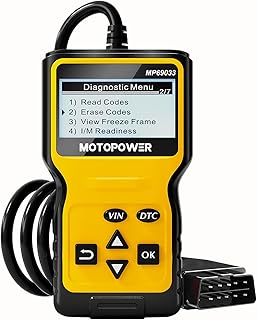
The MOTOPOWER MP69033 offers broad protocol support across 9 OBD II protocols, making it a strong all-around choice for a wide range of vehicles since 1996. It includes a built-in DTC lookup, read/erase codes, I/M readiness, live data, and a 2.8-inch LCD with backlight for easy viewing. No batteries or charger are required as the tool draws power from the vehicle. Best for: owners who need a versatile scanner with clear on-screen data and language options. A limitation is that the display, while readable, is smaller than some competitors’ high-end models.
- Better for: vehicles from different regions due to broad protocol support and multiple language options.
- Why selected: comprehensive DTC library access, real-time data, and no extra power requirements.
- Caution: the LCD is 2.8 inches; some users may prefer larger screens for prolonged sessions.
FOXWELL NT301 OBD2 Scanner

The FOXWELL NT301 is designed for fast diagnosis of Check Engine Light and other DTCs, with one-click access to reading and clearing engine fault codes. It offers I/M readiness indicators, a dedicated speaker for feedback, and a simple red-yellow-green status for inspection readiness. This makes it ideal for DIYers who want quick, reliable feedback before visiting a shop. A limitation is that it focuses on engine codes and basic readiness checks, not multi-system control.
- Best for: DIYers who want clear, fast engine code diagnosis and ready-for-inspection indicators.
- Why selected: one-click CEL reading/clearing, verification of readiness status, and audible feedback.
- Caution: does not provide full ABS/SRS or transmission diagnostics in one tool.
VDIAGTOOL VD10 OBD2 Scanner

The VDIAGTOOL VD10 is positioned as a must-have for DIYers who want a robust diagnostic tool without complexity. It reads and clears codes, shows live data, freeze frame, I/M readiness, and vehicle information, with a built-in DTC database covering over 3000 codes. It mirrors convenience often found in popular Fixd-style tools, offering quick access for common faults. Limitation: the data presentation may be basic compared with higher-end tools that provide advanced graphing and live data playback.
- Best for: car owners who want a straightforward, comprehensive code reader with accessible DTC definitions.
- Why selected: clear code retrieval, instant definitions, and straightforward erase/clear functions.
- Caution: may lack advanced live data visualization found in premium models.
FOXWELL NT604 Elite OBD2 Scanner

The FOXWELL NT604 Elite expands capabilities to include ABS and SRS (airbag) diagnostics, in addition to engine and transmission scanning. It supports the I/M readiness test and live data streaming, making it a strong choice for users who want to diagnose multiple systems and verify repairs. Best for: vehicle owners who need multi-system insight and more detailed fault information. A caveat is that while it offers broader scanning, it is not a repair tool and cannot reset issues without addressing the underlying cause.
- Best for: multi-system checks including ABS and SRS alongside engine diagnostics.
- Why selected: 5-in-1 diagnostic capability, live data, data playback, and printing options.
- Caution: cannot clear all fault codes if a repair hasn’t been completed; software limitations may apply on some models.
Buying Guide
What should I look for in a car scan tool?
Key factors include compatibility with the vehicles you own (OBDII protocols), ease of use, and the kind of data you need—basic codes, live data, or multi-system diagnostics. If you frequently service older cars, prioritize broad protocol support. For modern owners who want a quick read and clear definition, a device with a built-in DTC library and a readable display is ideal.
How important is live data and I/M readiness?
Live data helps you understand engine performance in real time. I/M readiness indicates whether your vehicle is prepared for emissions testing, which is essential before a smog or safety inspection. For proactive maintenance, prefer tools that clearly display live data graphs and quick I/M status indicators.
Which device should I choose for multi-system diagnostics?
For owners needing ABS and SRS insights, the NT604 Elite provides multi-system coverage. If you only need engine-level diagnostics, NT301 or AD310 offer fast, straightforward results. Consider how often you’ll inspect other systems before purchasing a multi-system tool.
What about price and ease of use?
Beginner-friendly devices emphasize plug-and-play operation, clear on-screen results, and simple code clearing with safe verification. More advanced units provide deeper data but have a steeper learning curve. Balance your budget with your desired depth of diagnostic capability.
Comparison snapshot
- Best for quick CEL checks: FOXWELL NT301 or ANCEL AD310.
- Best for broad vehicle support: MOTOPOWER MP69033.
- Best for DIYers who want DTC definitions and basic data: VDIAGTOOL VD10.
- Best for multi-system diagnostics: FOXWELL NT604 Elite.
FAQ
- What is the difference between OBD2 and CAN protocols? – OBD2 defines a standardized diagnostic interface; CAN is a common transport protocol used within OBD2 connections for faster data transfer.
- Do these tools require a battery? – Most plug directly into the vehicle’s OBDII port and draw power from the car; no extra battery is needed.
- Can I erase codes with all of these tools? – Most models can erase codes after repairs; some may require the issue to be resolved before clearing the CEL.
- Will these tools read live data? – Yes, all listed tools provide some form of live data or data display to help diagnose issues.
- Is multi-system diagnosis important for me? – If you own older or multiple vehicles, multi-system tools (ABS/SRS) offer broader insights beyond engine codes.
- Can these tools fix problems or only diagnose? – They diagnose and clear codes; repairing the underlying issue is required to permanently reset warning lights.