Direct answers for buyers seeking reliable OBD-II scanners and engine management tools. This guide highlights five top devices, who they’re best for, and what to watch out for. Ideal for DIYers, auto shop owners, and enthusiasts who want quick diagnostics, live data, and code navigation for modern vehicles. The table below compares core specs and use cases to help you pick the right tool quickly.
| Product | Best For | Key Benefit |
|---|---|---|
| ANCEL AD310 | Budget-conscious home mechanics | Fast reads and clears codes with simple operation |
| MOTOPOWER MP69033 | All-makes coverage | Wide protocol support and multilingual interface |
| FOXWELL NT301 | DIYers needing test readiness | One-click CEL reset and I/M readiness indicators |
| TOPDON AD500 | Advanced DIYers | 4-system diagnostics and multiple reset functions |
| ANCEL AD410 | Beginner to intermediate users | Extensive DTC library and live data |
ANCEL AD310 Classic Enhanced Universal OBD II Scanner

The ANCEL AD310 is a compact, budget-friendly OBD II scanner designed for quick fault-code reading and clearing on 1996 and newer vehicles. Best for home mechanics and technicians who want a straightforward tool without extra features. It provides live data, freeze frames, I/M readiness, and vehicle information, delivering fast results directly from the OBDII port.
Who it’s best for: buyers who want a simple, reliable scanner to diagnose engine light issues and confirm repairs without investing in advanced diagnostics. Why chosen: wide compatibility, clear display, and robust build for on-and-off use in garages or driveways.
Caution: as a basic tool, AD310 may lack deeper system diagnostics beyond emission-related data and live readings. It excels at fast checks but isn’t a substitute for professional-grade equipment in complex cases.
MOTOPOWER MP69033 Car OBD2 Scanner
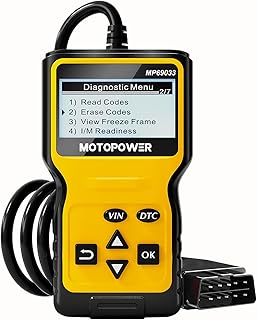
MP69033 offers broad OBD II protocol support across 1996 US, 2000 EU, and Asian cars, including newer CAN vehicles. It features a 2.8″ LCD with backlight and contrast adjustment, plus access to real-time data, freeze frame, and vehicle information. This makes it a versatile option for multilingual users who want clear visuals and rate insights during diagnostics.
Who it’s best for: users who need wide vehicle compatibility and a readable display for quick diagnosis. Why chosen: strong protocol coverage and a simple, battery-free power design that draws power from the vehicle.
Caution: some data depth may be limited on very new or highly specialized vehicles; real-time graphs can be less nuanced than premium models.
FOXWELL NT301 OBD2 Scanner

NT301 is designed for quick diagnosis with one-click engine light reading and clearing. It emphasizes accuracy and reliability, with a dedicated I/M readiness indicator and a built-in speaker for audible feedback. It’s an excellent choice for DIYers who want confirmation before taking a vehicle for inspection or repair.
Who it’s best for: owners who want clarity on pass/fail status and genuine CEL clearance after repairs. Why chosen: strong “clear first, fix later” approach and a clear readiness check that reduces inspection anxiety.
Caution: not a full benchmark tester; advanced module data and coding features are limited compared to higher-end models.
TOPDON AD500 OBD2 Scanner

TOPDON AD500 (ArtiDiag500) targets DIY enthusiasts with four-system diagnostics (engine, transmission, ABS, SRS) and six reset functions, plus DIY maintenance services. It visualizes real-time data in charts and supports data storage for later review. This tool is well suited for performance-minded users who want more than basic CEL handling.
Who it’s best for: hobbyists and professionals needing multi-system diagnostics and reset options in one device. Why chosen: comprehensive scope across major vehicle subsystems and practical data visualization.
Caution: the interface and feature set may require a learning curve for new users; cost and complexity are higher than basic readers.
ANCEL AD410 Enhanced OBD2 Scanner

AD410 expands on basic diagnostics with 42,000+ built-in DTC lookups and broad OBD II functionality. It supports reading/clearing codes, live data, freeze frame, O2 and EVAP tests, vehicle information, and MIL status. This makes it a strong pick for drivers who want a thorough, beginner-friendly diagnostic tool.
Who it’s best for: users who want a large DTC library and practical live data for ongoing maintenance. Why chosen: combines extensive code definitions with user-friendly live data insights.
Caution: while feature-rich, it may feel heavier than ultra-compact scanners; ensure you have room to navigate the menu efficiently in smaller vehicles.
Buying Guide: Key Purchase Considerations
- Vehicle compatibility and protocols: Confirm your vehicle’s year and region to ensure the device supports OBD-II, CAN, and any manufacturer-specific modes you may need.
- Diagnostic scope: Decide between basic code reading/clearing or multi-system diagnostics (engine, ABS, transmission, SRS). Advanced users may prefer charts and data logging.
- Live data and data presentation: Look for live parameter graphs or charts if you want deeper insight into engine behavior beyond static codes.
- User interface and readability: A bright, clear display and intuitive menus speed up troubleshooting, especially for beginners.
- Power source and portability: Most units pull power from the vehicle; consider size, weight, and cable length for in-vehicle use.
- Updateability: Some scanners offer Wi-Fi or USB updates. Regular updates expand DTC libraries and supported features.
How to Choose: Quick Reference
- Best for beginners: AD310 or AD410 for straightforward diagnostics and clear code definitions.
- Best for broad vehicle coverage: MP69033 if you drive many makes or newer cars with CAN data.
- Best for multi-system diagnostics: AD500 or similar models offering ABS/SRS and engine data with reset functions.
- Best for test readiness: NT301 for fast CEL checks and I/M readiness indicators before inspections.
FAQ
- What is OBD-II and why do I need it?
OBD-II is the standard diagnostic interface for most modern vehicles, providing access to engine and emission-related data to identify faults.
- Can these tools fix problems or just read codes?
They read and interpret codes, display live data, and sometimes guide repairs, but they do not repair parts themselves.
- Do these scanners require batteries?
Most plug directly into the vehicle’s diagnostic port and draw power from the car’s electrical system; no separate battery is needed.
- Do I need professional installation for advanced features?
Some features, like multi-system diagnostics, may require more experience; always follow the user manual.
- Are these tools compatible with all cars?
Compatibility varies by model and year. Check the protocol list and vehicle compatibility on the product page before buying.
- What is I/M readiness?
I/M readiness indicates whether your vehicle is prepared to pass emissions testing based on monitored systems.